Notes performance
Notes mode shows a grid of pitches from your current key and scale. Tap for a short note; hold your finger on a pad to sustain until you lift. Or turn on Hold in the Extras row to latch notes on and off with taps — see Hold mode.
Pad layout
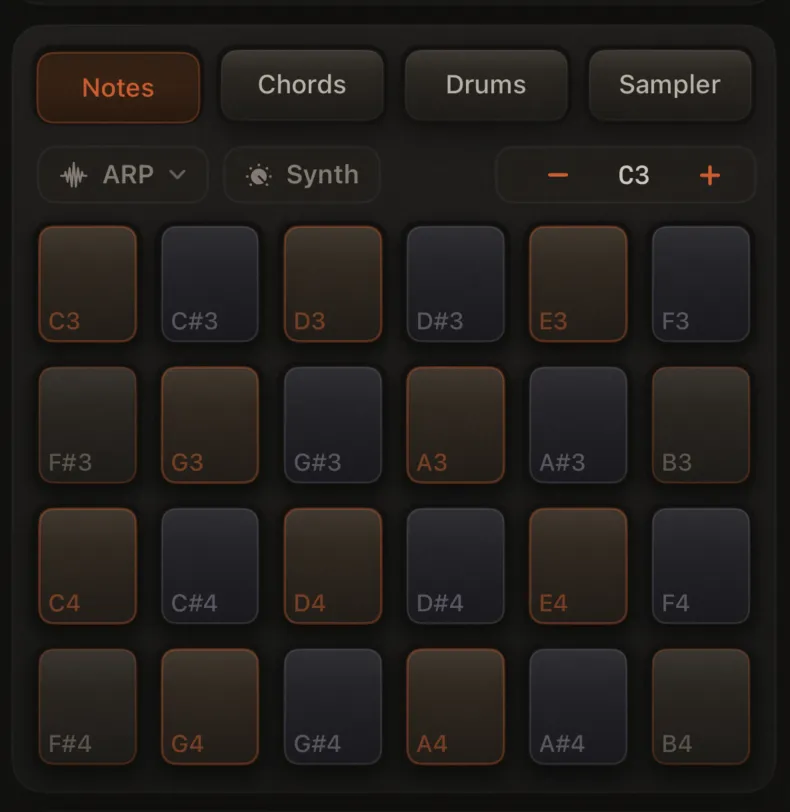
The grid has four rows of consecutive semitones starting from the key root (shifted by OCT). Column count depends on screen width (usually 6, 8, or 10). You get diatonic scale tones and chromatic passing notes in one layout.
Pad colors
The grid walks chromatic semitones from the key root (with the OCT stepper shifting register). Each pad’s cap tint and border show how the note relates to the current scale:
| Visual tier | Meaning | Look |
|---|---|---|
| Soft warm cap, medium orange border | Pentatonic-safe melody tones (e.g. C, D, E, G, A in C major) | Easiest notes to improvise with |
| Neutral cap, medium orange border | In scale but not in the safe set (e.g. F and B in C major) | Diatonic colour tones |
| Cool muted cap, soft gray-violet border | Chromatic — not in the scale (e.g. C#, F#, …) | Passing tones and tension |
When note names are on, labels follow the same tiers (accent / gray / muted).
Everything is playable — colors guide your ear, not restrict it.
Note name labels
Turn on Note names on pads in Setup → Pads to show names like C4 or F#3 on each pad.
Octave shift (OCT − / +)
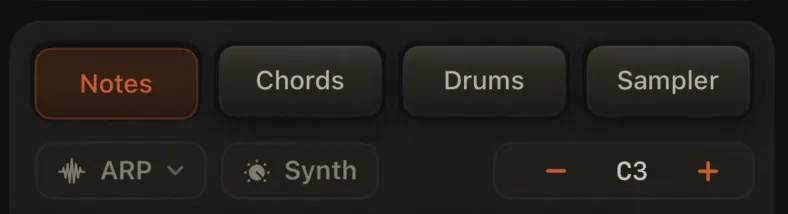
The OCT stepper above the grid moves the selected track's notes up or down by octave.
- Range: −3 to +1 octaves per track
- The readout shows the lowest note in the grid
- Each track remembers its own octave setting
Use this to reach bass notes without changing the song key.
Arpeggiator (ARP)
With an arpeggiator preset chosen, tapping a pad loops an arpeggio from that note instead of a single hit. See Arpeggiator (ARP).
Hold and Pulse are disabled while ARP is on for the selected track.
Hold mode (note latch)
Turn on Hold in the Extras row to toggle notes with taps (on/off) instead of finger pressure. Hold on/off is per track; latches on other tracks keep sounding when you switch. While armed and recording, latches auto-clear after one loop cycle. Great for sustained pads when your sound has sustain in the envelope.
MIDI note-ons toggle latched notes the same way when Hold is on. See MIDI input.
Full details: Hold mode.
Pulse mode
Tap Pulse in the Extras row and pick 1/4 · 1/8 · 1/16 · 1/32 to latch a note that retriggers on the tempo grid (tap another note to replace it). Mutually exclusive with Hold and ARP.
Full details: Pulse mode.
MIDI keyboard
With Enable MIDI Input on in Setup → MIDI, a USB or Bluetooth controller plays the selected track in Notes mode — each key sends its MIDI pitch with velocity, same as tapping pads (including Hold, Pulse, ARP, recording, and Erase).
See MIDI input.
Recording
- Select a track (T1–T6)
- Arm it
- Press Play and play the pads
Your performance is recorded on that track. Quantize and humanize (in Sound Design → Track → Recording) apply when the loop plays back.
Tips
- Layer parts — record on T1, switch to T2, arm, and add a melody over the top
- Tap vs finger-hold — taps for short notes; pressing and holding sustains until release (when Hold is off)
- Hold latch — toggle sustained notes with taps; see Hold mode
- Pulse — tempo-synced retriggers at 1/4–1/32; see Pulse mode
- Space Send — Mixer → FX → Atmosphere or the performance FX pill; adds a reverb tail that suits held notes
- Erase — clean up mistakes while the loop plays; see Erase mode
- MIDI — play from a USB or Bluetooth keyboard; see MIDI input
- Try Chords for harmony or Drums for rhythm