Arpeggiator (ARP)
ARP is ARC-24's arpeggiator. Tap a pad to latch a looping arpeggio rooted on that note: the pattern steps through pitches in rhythm, like a classic synth arpeggiator, but shaped to stay in key with your scale.
Each track has its own arpeggiator preset. ARP works only in Notes mode.
Turning the arpeggiator on
- Stay in Notes mode
- Tap the ARP pill (it shows "ARP" when off)
- The pattern picker opens — pick a preset, or Off to disable
Each track remembers its own preset. Changing tracks stops the phrase and loads that track's choice.
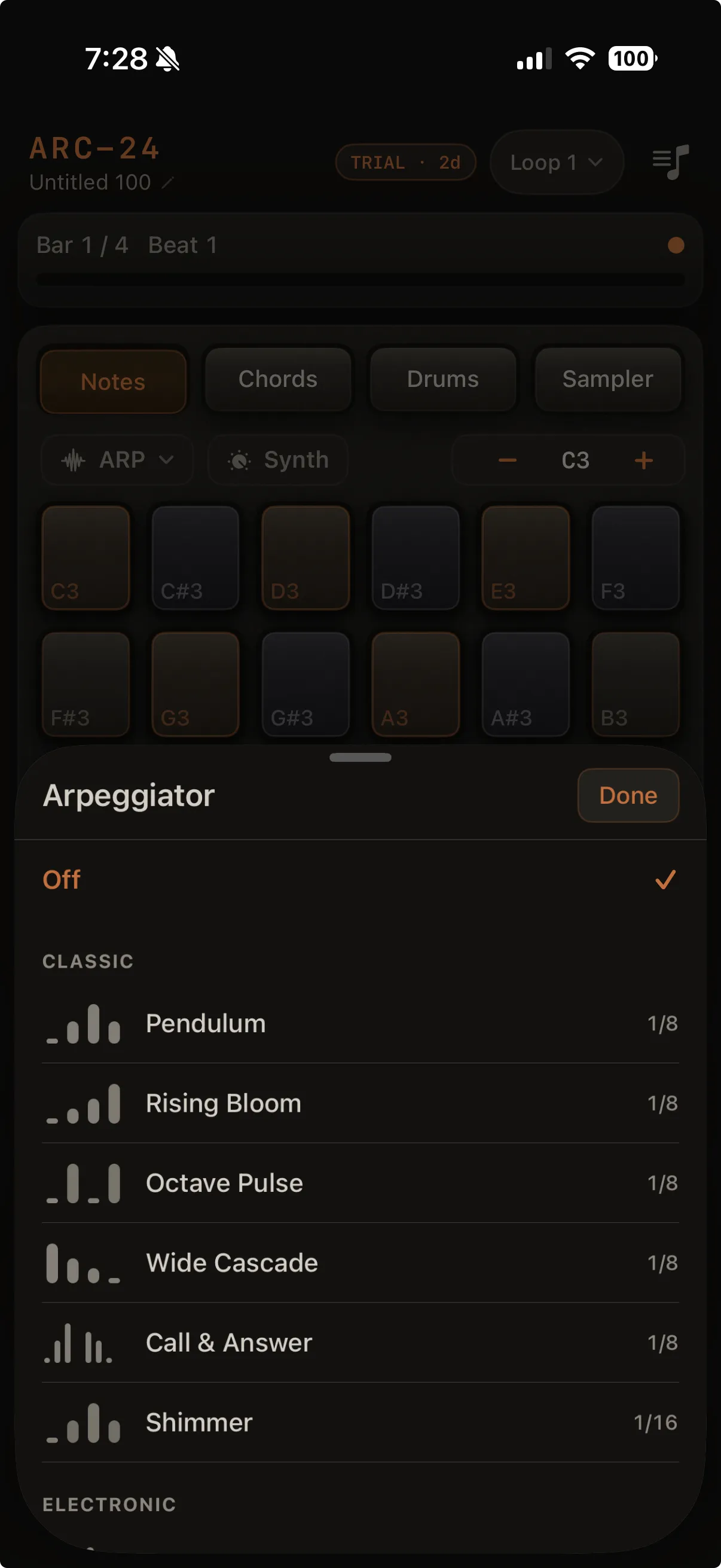
The pattern picker
Tapping the ARP pill opens a picker sheet (instead of a plain menu):
- Patterns are grouped into Slow & Sparse, Melodic, Driving, and Dark sections
- Each row shows a small contour graphic previewing the pattern's rise/fall and accents
- An Off row at the top turns the arpeggiator off
- Tap a pattern to apply it and close the sheet
Built-in patterns
ARC-24 ships 25 built-in arpeggiator presets. Each pattern steps through scale degrees relative to the pad you tap, so it stays in key with your loop's key and scale. Patterns loop until you stop them.
Slow & Sparse
| Name | Tempo | Character |
|---|---|---|
| Slow Drift | 1/4 | Unhurried quarter-note drift through sus-flavored degrees |
| Tide | 1/4 | Rising triad, then ebbing back with a rest |
| Ghost Pulse | 1/8 | Soft root pulse with ghost hits and an octave whisper |
| Smoke | 1/8T | Sparse triplet figures with rests — hazy, drifting motion |
| Deep Current | 1/4 | Ultra-sparse figures with a sub-octave anchor — dark ambient bed |
| Dub Echo | 1/8 | Sparse stabs with long rests — room for delay and reverb tails |
Melodic
| Name | Tempo | Character |
|---|---|---|
| Pendulum | 1/8 | Back-and-forth triad motion |
| Rising Bloom | 1/8 | Slowly rising triad that blooms up an octave |
| Wide Cascade | 1/8 | Wide descending cascade from octave to root |
| Call & Answer | 1/8 | Two-part phrase with breathing rests |
| Nightfall | 1/8 | Climbs to the octave, then sighs back down to a gentle resolution |
| Vespers | 1/8 | Flowing, hymn-like arc that reaches for the 7th and octave before settling |
| Hollow | 1/8 | Sparse, dramatic line with a leap to the 7th and a breath (rest) |
| Lazy Pocket | 1/8 | Rest-heavy eighths with accented downbeats — trip-hop / chillhop pocket |
| Pentadust | 1/8T | Sparse triplet dust — organic, folktronica-friendly motion |
Driving
| Name | Tempo | Character |
|---|---|---|
| Octave Pulse | 1/8 | Steady root eighths with octave lift on the upbeat |
| Shimmer | 1/16 | Fast, light sixteenth oscillation |
| Neon Crawl | 1/16 | Sixteenth i-chord crawl with an octave peak — retro synth-arp |
| Berlin Run | 1/16T | Maj7 arpeggio in sixteenth triplets — Stranger Things / Tangerine Dream vibe. The 7th step follows your scale (major 7th in major modes, minor 7th in minor/Dorian) |
| Pulsar | 1/16 | Driving root↔octave pulse with the 3rd, 5th, and 7th woven onto off-beats |
| Submerge | 1/16 | Dense sixteenth texture with ghost doubles |
| Rolling Haze | 1/16 | Tight four-step loop — psybient / psychill rolling motor |
Dark
| Name | Tempo | Character |
|---|---|---|
| Strobe | 1/16 | Octave pulse with darker descending color tones (6th → 4th → 3rd) |
| Lowlight | 1/8 | Low octave-root anchor alternating with a brooding mid-register figure |
| Halftime Drag | 1/8 | Wide eighth spacing with rests — halftime / future-garage drag |
Tempo key: 1/4 = quarter notes (slowest) · 1/8 = eighths · 1/8T = eighth triplets · 1/16 = sixteenths · 1/16T = sixteenth triplets (fastest, rolling feel). Step length follows your song BPM.
Pairing tip: slow patterns (1/4, sparse 1/8) work best with long-release pads; fast 1/16 patterns pair with shorter-release plucks and leads so notes don't smear together.
Playing arpeggios
With a preset selected:
- Tap a pad — starts the pattern from that note; it loops until you stop it
- Tap another pad — moves the pattern to the new note
- Tap the same pad again — stops
- Choose Off in the picker — stops and turns ARP off
Lifting your finger doesn't stop ARP — only taps matter.
The root pad you chose shows a steady highlighted outline (separate from quick flashes as each step plays).

Recording with the arpeggiator
When you're armed and recording:
- The arpeggiator runs for one time through the loop, then stops automatically so the recording doesn't double up with live playback
When you're not recording, arpeggios can run as long as you like.
The arpeggiator stops when you
- Tap the root pad again or choose Off in the picker
- Switch tracks
- Switch to Chords or Drums
- Leave the app (background)
Erase, Hold, and the arpeggiator
| Tool | Interaction with ARP |
|---|---|
| Erase (while playing) | Erases instead of starting an arpeggio |
| Hold | Disabled on the selected track while an ARP preset is on — turn ARP Off to latch notes |
See Hold mode and Erase mode.
Octave stepper
OCT − / + still shifts the range — arpeggiated notes follow the same grid as your pads.