Mixer
The Mixer tab controls volume, pan, mute, solo, EQ, and insert FX for all eight tracks (synth, sample, or drums).
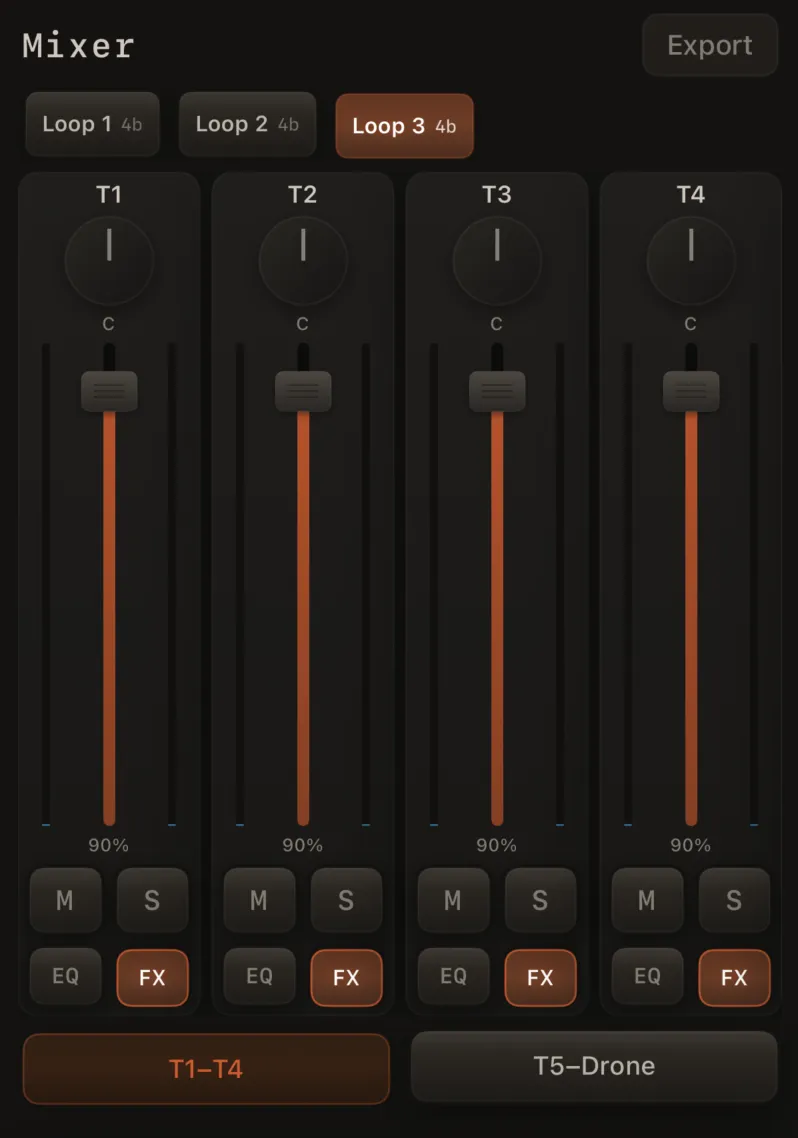
Channel strips
Each T1–T8 strip has:
- Volume fader
- Pan knob — drag up/down to pan; double-tap re-centers; the pointer glows orange when panned off-center
- M and S — mute and solo (one row, side by side)
- EQ and FX — equalizer and insert rack (one row, side by side)
Tap EQ to open a 3-band equalizer:
| Band | Frequency | Range |
|---|---|---|
| Low | 200 Hz | ±12 dB |
| Mid | 1 kHz | ±12 dB |
| High | 6 kHz | ±12 dB |
Insert FX (track strips)
Tap FX to open the per-track FX sheet — the single home for every channel effect on that track (synth, sample, or drums). The FX button lights when anything in the rack is active.
The sheet is laid out in processing order:
| Section | Processors |
|---|---|
| Character | Texture bed, air, stereo width, warmth |
| Filter | Resonant low-pass or high-pass (cutoff, resonance, mix) |
| Dynamics | Compressor (threshold, ratio) and gate |
| Color | Distortion, bit-crusher, ring modulator |
| Modulation | Flanger (depth, rate) — short ms delay sweep with resonant feedback |
| Time | BPM-synced delay — Digital, Analog, or Tape style; subdivision synced to song tempo |
| Reverb (Tone) | Short color reverb (Style + Tone Mix) — sweetens tone, no long room tail |
| Atmosphere | Space Send, Chorus, and Tape Wow — real Freeverb tail plus stereo modulation (chain: chorus → Freeverb → tape → width). Applies to all instrument types |
| Motion | Motion Amount, Motion Rate, Bloom (toggle + amount) — slow filter motion on synth tracks; Bloom opens the filter on live hits for that track only |
Use Reset in the FX sheet to clear everything in the rack on that track. Restore Default Sound in Sound Design only resets the synth voice (and its tone reverb) — it does not clear Atmosphere, Character, Motion, or the inserts.

Drum tracks
There's no dedicated Drums strip anymore — drums are a track instrument, so a drum track is an ordinary T1–T8 strip with the full channel chain: fader, pan, M/S, 3-band EQ, and the complete FX rack. Kit choice opens the kit picker sheet from the performance kit pill or the track's Drum Settings; per-pad shape from Pads on the performance screen.
Solo
When solo is on for any track, you only hear the soloed channels.
- Mute and solo can't both be active on the same strip — turning one on turns the other off
- Soloing one channel doesn't make the mix suddenly louder — mute/solo changes ramp smoothly (~8 ms) to avoid clicks

Level meters
Each strip shows a level meter beside the fader. Meters move both when recorded loops play back and when you play live — tapping pads, previewing, running an arpeggiator, or playing drums and samples — so you get visual feedback even with the transport stopped. They settle back to silence when the sound dies away.
iPhone: Mixer tab layout
On iPhone, the Mixer tab includes the control bar at the bottom (play, record, arm, undo, metronome, BPM). Strips use a compact layout above it.
Strips paginate four per page on most iPhones — swipe between pages:
- Page 1: T1–T4
- Page 2: T5–T8
Use the page dots to jump between them.
Loop scene launcher
When your song has two or more loops, a row of loop pads appears in the Mixer.
Tap a pad to switch scenes during a live performance. See Live loop scenes.

Export
Tap Export in the Mixer header to open the export sheet (same as exporting from the song list).
Your mix is saved per loop
Volume, pan, mute, solo, EQ, and insert FX for the current loop are saved into your song automatically. When you switch loops (or come back later), each loop recalls its own mix.
Related
- Live loop scenes
- Track sound design — synth voice in Sound Design; all channel FX in this Mixer sheet
- Export